The symptom is encrypted email NOW [post update to 365] coming in is not “seamlessly” opened in Outlook. The encrypted emails are coming from the same person and no certs have been changed.
Previously upon opening an encrypted message, I was prompted for my passcode, and the email would open completely (i.e. no attachment clicking) … AKA the “seamless” behaviour.
Now when I open a RECENT email, I have to click on an attachment that opens up with the another message containing two attachments, one being the ASC attachment which I click on, then enter my code and the message decrypts and is viewable. The “seamless” integration is not there.
Oddly though, if I open an OLDer encrypted message, the full un-encrypted email appears immediately (since my code was already entered) but going back to a NEW encrypted message, I still have to do the attachment dance.
This behaviour was happening while running a v3 GPG4Win (had not updated in awhile) so I updated to v4.4.1 (after the switch to Outlook 365) but still see the same thing.
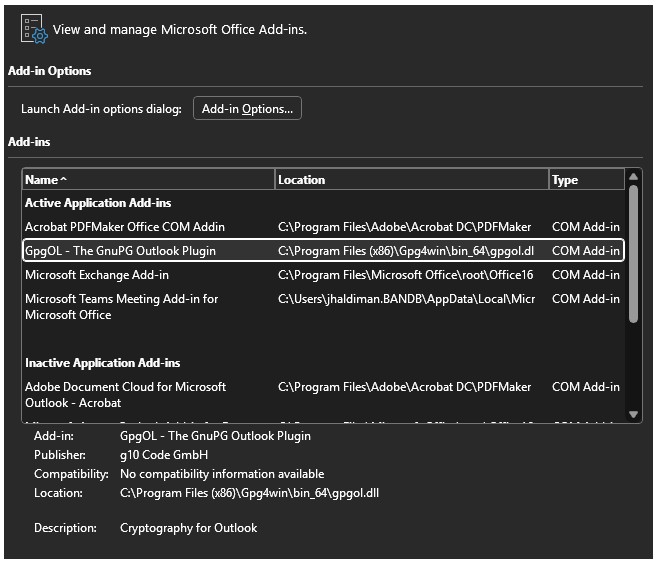
GPGOL is active in the ADD-IN dialog but I have not fiddled with any GPGOL settings.
If the problem is the Outlook 365, would seem like it would act the same no matter whether a new encrypted message or old.
Hi @larryg, did you install any new add-ins that might be incompatible? Maybe it could help to enable logging in the GpgOL settings to find out what the problem is.
To my knowledge … no … but here is a photo of what is there. Am working on the getting a LOG posted, plus reviewing it some myself for PII as well as anything obvious! Hope to have that posted in a couple days. Thank you @cklassen !!! LarryG
Are you saying that all messages you received before a certain date are shown as you expect they should, even at present?
And all you receive now are always shown as attachments? Even if you have already decrypted those new messages in the past?
What is the name of the attachment? Is it something generic, the same in every mail?
Have you tested if the new mails are shown as attachments regardless of if they have regular attachments (like a pdf file) or not? Experiment with mails you sent to yourself and check if this also occurs if the mail has no regular attachment.
YES … retested today … the 365 upgrade (?) was done in DEC 2025. All messages tested prior to that date STILL open “seamlessly” (you open the reicevd message, are prompted for passcode, and the message opens as an Outlook message). Any message received AFTER that date, requires the attachment dance, and ends in a KLEO dialog, not Outlook. A correction to the original info, have had 365 subscription (desktop) all along but the mail server was changed from SMARSHMAIL to a Microsoft 365 exchange server. Possibly the new server is handling the encrypted mail differently.
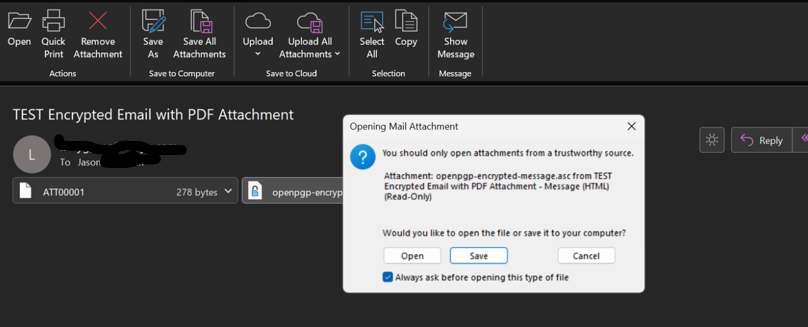
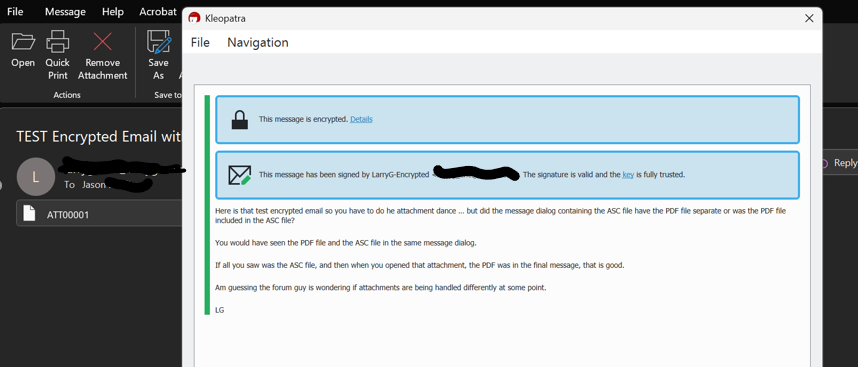
YES .. new messages with or without file attachments show first as an “Outlook Item” attachment (Image 1), then upon clicking that item, am shown as a message with two attachments, an ATTXXXX and and ASC file (Image 2). Upon clicking the ASC file, you are prompted with and OPEN/SAVE/Cancel dialog (Image 2). Clicking OPEN, and entering passcode (if not already entered or timed out) the message is decrypted into a KLEO dialog with any file attachments (Image 3, note separate file attachments (PDF) not show due to I cut it off the screenshot).
And YES, the ASC file has the same attachment name but unfortunately I covered that up with the OPEN/SAVE dialog.
YES … whether post-DEC message has file attachments or not, the Outlook Item followed by ATX and ASC attachments ending in a KLEO dialog still occur.
Hopefully getting enough pieces of the puzzle for one of you smart guys to have a brain epiphany!
It seems like the GPOL plug-in is not effective for any message after the DEC upgrade, given the attachment dance ends in a KLEO message dialog, not an Outlook message dialog. Potentially the new Exchange Mail server is stripping something out of the encrypted message that renders the GPOL plug-in inert.
Enabled LOGGING with MAIL CONTENT ON and OFF to create two separate files so I could DIFF for my own edumacation!
Both files are included … GPOL_NOMAIL.TXT and GPOL_MAIL.TXT.
FYI … Sender IPs replaced with 192.168.1.1
Sender EMAIL pre and postfix replaced with XXXXXXX
Recipient EMAIL prefix replaced with JLASTNAME
Recipient EMAIL postfix replaced with YYYYYYY.com
The intention was to OPEN THE SAME post-DEC message with MAIL CONTENT ON and OFF creating two separate LOG files that could be DIFF’d. Wanted to see if I could determine anything from a DIFF that would highlight the common parts and separate the MAIL CONTENT easily.
Now to tie the @eebb comments into this … the test encrypted mail item used for both the GPOL…txt files required the attachment dance (aka non-seamless behavior) which resulted in a KLEO mail dialog vs an Outlook message dialog (aka seamless behavior).
Image 3 is helpful, this viewer should not come up for mails in the usual format.
I’m not good at reading gpgol logs, but this seems suspicious:
16:49:32/29524/application-events.cpp:Invoke: ItemLoad event. Getting object.
16:49:32/29524/application-events.cpp:Invoke: Creating mail object for item: 00000112ab9fa0c0
16:49:32/29524/mapihelp.cpp:mapi_change_message_class: Getting mgsclass tag 0x84ef001e failed hr=0x8004010f
16:49:32/29524/mapihelp.cpp:mapi_change_message_class: checking message class `IPM.Note'
Maybe the mail format changed when you changed the server and it is something which can be configured in the exchange server? We test with MS exchange (with MS 365 accounts) and mails are shown “seamlessly”, as you named it.
Although we use the desktop application, so it might be an issue with the app, instead. On the other hand your screenshots look like the desktop app. Maybe you meant you use now a MS 365 license with the classic desktop app?
I’ll try to get a developer to look at the logs, hopefully they will see more.
The already mentioned 0x80040010f, some 0x80070005 meaning Access denied when trying to change the message class and 0x80020009 when trying to set the UID property.
So maybe the later once are a result of the first problem. When looking for the errorcode I found the following on the MS-site. As the problem happed after an account/server change and only affects new mails it could very well be a corrupted local outlook profile. So you could follow the MS-site advice, or If you have access to a different PC/VM install a fresh Outlook and GPG there and see if you get the same problems.
@eebb Thanks for passing that along to developers. The very first post did state the instance is still the “classic” outlook vs running Outlook thru a browser type setup which is the non-desktop version (or so I understand). So am in agreement this is the “classic desktop installed app/program”. I am old school … apps are still programs, just “lite / lean” versions or at least supposed to be!
@mmo Saw a couple of those errors when reviewing the file but it was late so did not try to search on them so THANK YOU for doing that. What you found sounds promising so will pull that up and see what can be tested.