Hi everyone,
I use Portable Apps and have been using Gpg4win. Now I want to use a YubiKey as well, so I need smart card support. This works very well locally with Gpg4win 5.0.2. Unfortunately, I haven’t found a portable/mobile GPG software or Gpg4win version.
So, I tried creating a mobile version myself following these instructions: Gpg4win/PortableVersion - GnuPG wiki. It didn’t work right away—I’m just a user, not a programmer, and I don’t really know the technical details.
Based on the error message, I copied the contents of the “bin” directory into the “Gpg4win_Portable” folder, and now it runs.
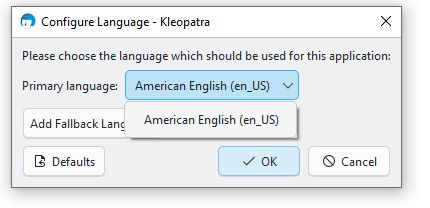
But here’s the catch: I haven’t been able to change the language. The only option available is US English.
Does anyone have a tip or a solution? I’d be very grateful.
Best regards.
Hi Atze, I have never made or used a portable version, but as nobody else has answered…
The language for what? Kleopatra?
And where have you tried to change the language?
Hi,
I finally got around to checking this with Procmon.
I didn’t find anything—though that’s what I expected.
Procmon seems to log all Windows activity.
However, I have Kleopatra on an external SSD and launch it via “PortableApps”, so it wasn’t logged.
It logs everything, look for a procmon howto. You need to filter the data, maybe filtering by process name “kleopatra.exe” is already enough to see something.
Hi,
I ran procmon again.
My mistake last time must have been searching only for “Kleo”.
Now I have quite a bit of data in the log file, but I’m still none the wiser.
I can’t upload the log file here, can I?