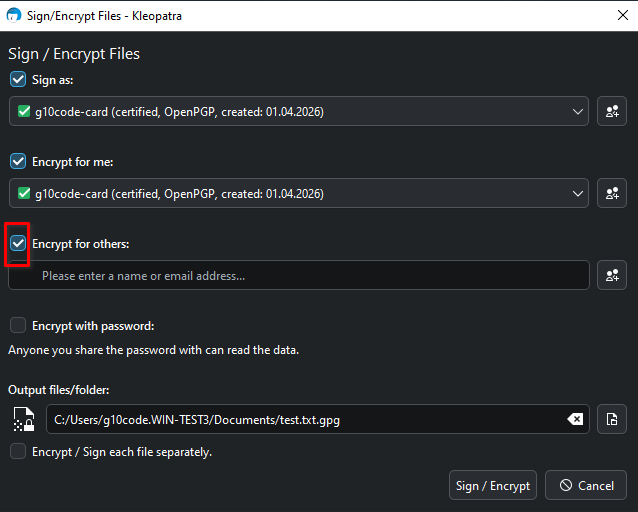
Previous versions of Kleopatra let me enter the enter the encryption key only once to encrypt a file. The latest version requires three key entries. How do I get back to one entry?
In previous versions, when I right-clicked on a file, one of the options was to sign/encrypt the file. I no longer see this option.
For that one the check boxes started to be honored with version 5.0.0. After removing the check mark highlighted in the picture, Kleopatra won’t ask you to add a key for another recipient.
In version 5.0.0 the check mark was back for every new encryption but with version 5.0.2 the setting from the last time is remembered by default.
I guess you changed from Windows 10 to Windows 11. In Windows 11, the encryption options from Gpg4win where moved to the submenu you can access via “Show more options”. This is no caused by Gpg4win. You can configure Win11 to show the old context menu, as explained here in an article on the Microsoft page.