Bram
July 13, 2026, 1:20pm
1
Hi,
i’m currently on v.4.4.1 because this failed with v5.0.2
I’m using gpg4win to sign git commits .
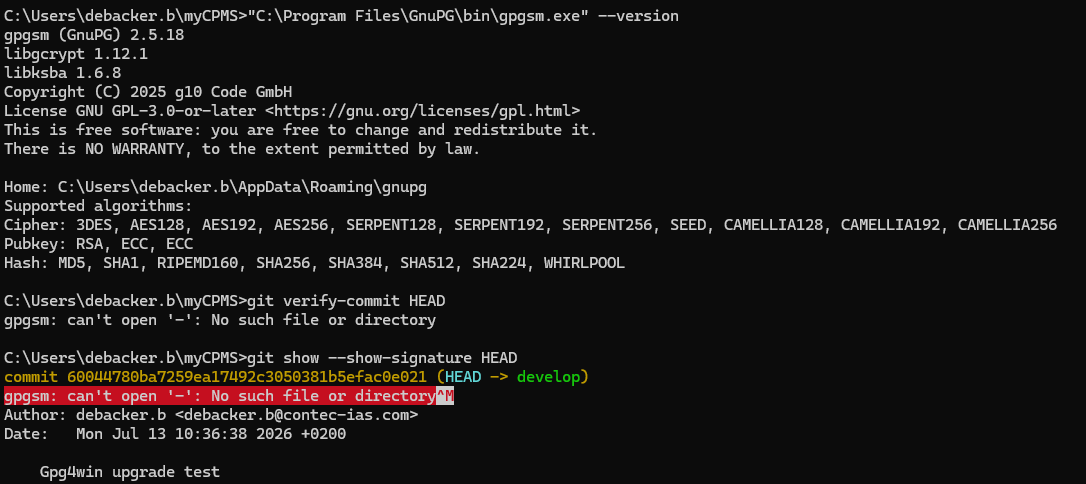
The signing works without issue, but when trying to verify, this happens:
git verify-commit 0a5cbe2432d8
16:34:14.632593 run-command.c:674 trace: run_command:
‘C:/Program Files/GnuPG/bin/gpgsm.exe’
--status-fd=1
--verify
‘C:\Users\[redacted]\AppData\Local\Temp/.git_vtag_tmpWmNmM5’
-
16:34:14.632593 run-command.c:946 trace: start_command:
‘C:/Program Files/GnuPG/bin/gpgsm.exe’
--status-fd=1
--verify
‘C:\Users\[redacted]\AppData\Local\Temp/.git_vtag_tmpWmNmM5’
-
gpgsm: can’t open ‘-’: No such file or directory
The same happens outside of git verify:
gpgsm --verify test.p7m -
result:
gpgsm: can’t open ‘-’: No such file or directory
[GNUPG:] FAILURE gpgsm-exit 50331649
`
eebb
July 13, 2026, 2:23pm
2
Hi @Bram ,
Powershell compatibility is (at least currently) no development target of ours.
Bram
July 13, 2026, 2:28pm
3
I will upgrade again, and test under cmd.exe.
Bram
July 14, 2026, 9:56am
4
I have now tested under CMD.exe. the same issue occurs.
eebb
July 14, 2026, 1:38pm
5
A colleague of mine has reproduced this and made a ticket, you can follow the developments there: ⚓ T8347 GpgSM: Verification of detached signature via pipe fails Thank you for the report!
I’d suggest to use the gpg version shipped with git for now, which is newer than the one in gpg4win 4.4.1; 2.4.9 instead of 2.4.8
Out of curiosity: what is the advantage for you in using Gpg4win instead of the gpg version delivered by git?
Bram
July 15, 2026, 10:48am
6
honestly, i wasn’t aware git had an embedded gpg … i just followed a copilot-created guide.
My situation is: we use a git-repository linked to Diffusion (part of Phabricator, now Phorge, which I saw the gpg4win team is also using). I want to use corporate certificates.
I’m gonna try and use the git-embedded gpg, thanks for the suggestion.
eebb
July 15, 2026, 12:00pm
7
I don’t know if all git for Windows packages include it, but here it is included: