After selecting a folder in Outlook wich contains a signed mail (by own), Outlook is hanging.
Claude tell me:
What happens in the log
Five emails in a folder are continuously cycling through the same process. Over the course of just over 2 minutes, this resulted in approximately 3,200 iterations—roughly 25 per second:
Outlook loads the email (BeforeRead/Read).
GpgOL detects that it is OpenPGP-signed (application/pgp-signature). However, Exchange has classified it as IPM.Note.SMIME.MultipartSigned.
GpgOL changes the message class, resets it, and saves the email (Restoring message class… in decverify → Save → Write).
Because the email has been saved, it is marked as modified. Outlook unloads it and reloads it, and the entire cycle begins again.
This will have to be checked out by an developer, I’ll point them to it.
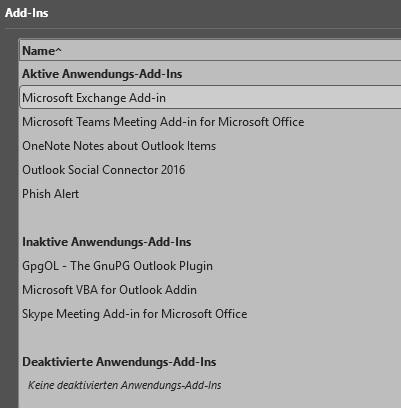
Can you please tell us which Outlook version you are using (File → Office account → Info about Outlook) and which other COM-Add-Ins are installed (File → Manage COM Add-Ins).
I believe the signature is an S/MIME signature, correct?
As to if you can solve the issue yourself: If the cause turns out to be an incompatibility with another COM-AddIn, then deactivating that one would solve it.
These are known incompatible ones: GpgOL/IncompatibleAddons - GnuPG wiki.
I’ll answer in EN and paraphrase your last post first, so that other users can follow this better. Heiko wrote that he deactivated all his Outlook-AddIns and activated them again one after the other. And now everything works again.
In my experience Outlook (with GpgOL, as I always have it installed) often shows weird/buggy behavior after an update which sometimes does only stop after a full reboot. The version you have has been released only very recently, not even a week ago and MS does not push updates to all users immediately. So this might be an update issue and could now be gone for good.
Please give an update should the issue occur again.