Gpg --keyserver xxxx --search-keys yyyy -> No keyserver available on GPG4WIN (but works fine on Linux)

The problem happens when I use gpg … –search-keys, as it always returns :

gpg: error searching keyserver: No keyserver available
gpg: keyserver search failed: No keyserver available

When I use the exact same commands on a Linux machine it works just fine.

I initially noticed the problem when I via Kleopatra wanted to check a signature of a file (without having the public key which was used to sign the file in Kleopatra). Kleopatra told me first that the signer was unknown, and when I then pushed the button to search for the key I got a pop-up with:

‘Information - Kleopatra’ ‘failed to search on certificate server. The error returned was: No keyserver available’

So to investigate the problem a bit more ‘raw’ than via Kleopatra I used the ‘gpg’ line command (shipped with Kleopatra) to collect some information.

I didn’t find anything in this forum that came ‘close enough’ to this situation, so therefore I created this case.

And I’m aware of that –keyserver is deprecated, but deprecated features should of course still work (until they are removed).

I have tried different keyservers but the same problem occurs with all keyservers. I have also tried without specifying any keyserver - same result.

More info / example

On Windows 11:

C:>gpg --debug-all --keyserver https://keys.openpgp.org:443 --search-keys CAAE408AEBE2288E96FC5D5E157432CF78A65729
gpg: reading options from ‘C:/Users/xyz/AppData/Roaming/gnupg/gpg.conf’
gpg: reading options from ‘\[cmdline\]’
gpg: enabled debug flags: packet mpi crypto filter iobuf memory cache memstat trust hashing ipc recsel clock lookup extprog keydb
gpg: enabled compatibility flags:
gpg: DBG: \[no clock\] start
gpg: DBG: chan_0x0000000000000258 ← # Home: C:\\Users\\xyz\\AppData\\Roaming\\gnupg
gpg: DBG: chan_0x0000000000000258 ← # Config: C:/Users/xyz/AppData/Roaming/gnupg/dirmngr.conf
gpg: DBG: chan_0x0000000000000258 ← OK Dirmngr 2.5.18 at your service, process 26632
gpg: DBG: connection to the dirmngr established
gpg: DBG: chan_0x0000000000000258 → GETINFO version
gpg: DBG: chan_0x0000000000000258 ← D 2.5.18
gpg: DBG: chan_0x0000000000000258 ← OK
gpg: DBG: chan_0x0000000000000258 → KEYSERVER --clear https://keys.openpgp.org:443
gpg: DBG: chan_0x0000000000000258 ← OK
gpg: DBG: chan_0x0000000000000258 → KS_SEARCH – CAAE408AEBE2288E96FC5D5E157432CF78A65729
gpg: DBG: chan_0x0000000000000258 ← ERR 167772346 No keyserver available 
gpg: error searching keyserver: No keyserver available
gpg: keyserver search failed: No keyserver available
gpg: DBG: chan_0x0000000000000258 → BYE
gpg: DBG: \[no clock\] stop
gpg: keydb: handles=0 locks=0 parse=0 get=0
gpg:        build=0 update=0 insert=0 delete=0
gpg:        reset=0 found=0 not=0 cache=0 not=0
gpg: kid_not_found_cache: count=0 peak=0 flushes=0
gpg: sig_cache: total=0 cached=0 good=0 bad=0
gpg: objcache: keys=0/0/0 chains=0,0..0 buckets=0/0 attic=0
gpg: objcache: uids=0/0/0 chains=0,0..0 buckets=0/0
gpg: random usage: poolsize=600 mixed=0 polls=0/0 added=0/0
outmix=0 getlvl1=0/0 getlvl2=0/0
gpg: rndjent stat: collector=0x0000000000000000 calls=0 bytes=0
gpg: secmem usage: 0/32768 bytes in 0 blocks

C:>

C:>which gpg.exe
C:\\Program Files\\GnuPG\\bin\\gpg.exe

C:>gpg --version
gpg (GnuPG) 2.5.18
libgcrypt 1.12.1
Copyright (C) 2025 g10 Code GmbH
License GNU GPL-3.0-or-later <https://gnu.org/licenses/gpl.html>
This is free software: you are free to change and redistribute it.
There is NO WARRANTY, to the extent permitted by law.

Home: C:\\Users\\xyz\\AppData\\Roaming\\gnupg
Supported algorithms:
Pubkey: RSA, Kyber, ELG, DSA, ECDH, ECDSA, EDDSA
Cipher: IDEA, 3DES, CAST5, BLOWFISH, AES, AES192, AES256, TWOFISH,
CAMELLIA128, CAMELLIA192, CAMELLIA256
Hash: SHA1, RIPEMD160, SHA256, SHA384, SHA512, SHA224
Compression: Uncompressed, ZIP, ZLIB, BZIP2

C:>

On Linux:

gpg --debug-all --keyserver https://keys.openpgp.org:443 --search-keys CAAE408AEBE2288E96FC5D5E157432CF78A65729
gpg: reading options from ‘\[cmdline\]’
gpg: enabled debug flags: packet mpi crypto filter iobuf memory cache memstat trust hashing ipc clock lookup extprog
gpg: enabled compatibility flags:
gpg: DBG: \[no clock\] start
gpg: DBG: chan_3 ← # Home: /home/xyz/.gnupg
gpg: DBG: chan_3 ← # Config: /home/xyz/.gnupg/dirmngr.conf
gpg: DBG: chan_3 ← OK Dirmngr 2.4.7 at your service, process 29588
gpg: DBG: connection to the dirmngr established
gpg: DBG: chan_3 → GETINFO version
gpg: DBG: chan_3 ← D 2.4.7
gpg: DBG: chan_3 ← OK
gpg: DBG: chan_3 → KEYSERVER --clear https://keys.openpgp.org:443
gpg: DBG: chan_3 ← OK
gpg: DBG: chan_3 → KS_SEARCH – CAAE408AEBE2288E96FC5D5E157432CF78A65729
gpg: DBG: chan_3 ← S PROGRESS tick ? 0 0
gpg: DBG: chan_3 ← S SOURCE https://keys.openpgp.org:443
gpg: DBG: chan_3 ← D info:1:1%0D%0Apub:EF6E286DDA85EA2A4BA7DE684E2C6E8793298290:1:4096:1418637242::%0D%0Auid:Tor%2520Browser%2520Developers%2520(signing%2520key)%2520%253Ctorbrowser@torproject.org%253E:1721044772::r%0D%0A
gpg: data source: https://keys.openpgp.org:443
gpg: DBG: chan_3 ← OK
gpg: DBG: iobuf-1.0: close ‘?’
(1)     Tor Browser Developers (signing key) <torbrowser@torproject.org>
4096 bit RSA key 4E2C6E8793298290, created: 2014-12-15
Keys 1-1 of 1 for “CAAE408AEBE2288E96FC5D5E157432CF78A65729”.  Enter number(s), N)ext, or Q)uit >

which gpg
/usr/bin/gpg

gpg --version
gpg (GnuPG) 2.4.7
libgcrypt 1.11.0
Copyright (C) 2024 g10 Code GmbH
License GNU GPL-3.0-or-later <https://gnu.org/licenses/gpl.html>
This is free software: you are free to change and redistribute it.
There is NO WARRANTY, to the extent permitted by law.

Home: /home/xyz/.gnupg
Supported algorithms:
Pubkey: RSA, ELG, DSA, ECDH, ECDSA, EDDSA
Cipher: IDEA, 3DES, CAST5, BLOWFISH, AES, AES192, AES256, TWOFISH,
CAMELLIA128, CAMELLIA192, CAMELLIA256
Hash: SHA1, RIPEMD160, SHA256, SHA384, SHA512, SHA224
Compression: Uncompressed, ZIP, ZLIB, BZIP2

====================

Please help if you can :slight_smile:

Best regards
Frank

Hi @flagpg4win,

Afaik --keyserver is not deprecated per se, only putting it in gpg.conf is. It should instead be written into dirmngr.conf, if one wants to write it into a config file. The command line usage says the same.

I tried this with Gpg4win 5.0.2 (gpg 2.5.18) on WIN 10 (and 11) and it worked 4 out of 5 times. I got an error on the first try, but another one as you (“Invalid length”), after that the search worked.

But for import to work, too, you need to give the keyserver as hkps://keys.openpgp.org, otherwise it will return html which gpg will complain about…

Could the search failure with “No keyserver available” be a network issue?

Hi @eebb

Thank you for your comments

Regarding --keyserver deprecation: According to GPG Configuration Options (Using the GNU Privacy Guard) (search for –keyserver on the page) it is deprecated - it was this I based my statement regarding that the –keyserver option is deprecated.
But as mentioned: –keyserver is recognized and used as option for the gpg, so the info about deprecation was just to avoid confusion.

Regarding the ‘https’ prefix / scheme: It works just fine with –keyserver https://keys.openpgp.org:443 on my linux machine, and it also works fine with the gpg command included in the ‘git for windows’ ( https://git-scm.com/download/win ) which is installed on the same Windows 11 PC where my GPG4WIN packages is installed.

But I tested also with the “hkps” scheme (gpg --debug-all --keyserver hkps://keys.openpgp.org --search-keys CAAE408AEBE2288E96FC5D5E157432CF78A65729) but this gave the same result as when I used the ‘https’ scheme as described before:

  1. It works with my Linux gpg command
  2. It works on the ‘git for windows’ gpg.exe
  3. It unfortunately doesn’t work with the gpg4win (C:\\Program Files\\GnuPG\\bin\\gpg.exe) gpg.exe
    So it scheme didn’t cause the problem.

And since my ‘git for windows’ gpg.exe works fine it isn’t a network / firewall issue (since both ‘git for windows’ and the ‘gpg4win’ are on the same Windows 11 PC) - and to be extra sure I even (temporary for testing this) disabled the Windows Defender Firewall - but that didn’t help either - i.e. it still didn’t work with the gpg4win gpg.

I have also started ‘Process Monitor’ ( Process Monitor - Sysinternals | Microsoft Learn ) and then monitored the network activity when executing gpg --debug-all --keyserver hkps://keys.openpgp.org --search-keys CAAE408AEBE2288E96FC5D5E157432CF78A65729 on the gpg.exe included in GPG4WIN and the gpg.exe included in ‘git for windows’. The result was that when I executed the gpg.exe from the ‘git for windows’ I saw that “dirmngr.exe” connected to keys.openpgp.org. But when I executed the gpg.exe from the gpg4win no connection to keys.openpgp.org was established.

And I also started Wireshark. Result: When I used the mentioned command with the gpg.exe from ‘git for windows’ I saw the connection being estabilshed. But when I used the gpg.exe with gpg4win no connection to keys.openpgp.org (195.201.47.43) is even attempted

It is quite interesting/strange that it worked for you on the gpg4win gpg version 2.5.18, since that is the same version as mine (which doesn’t work for me). Unfortunately I have no idea why.

Is there some setting (in the Kleopatra gui) which I might have ‘messed up’ ? I can include the two main (a.f.a.i.k.) config files :

gpg.conf:

###++±-- GPGConf —+++###
utf8-strings
auto-key-locate local
auto-key-retrieve
###++±-- GPGConf —+++### 05/26/26 21:51:50 W. Europe Summer Time

# GPGConf edited this configuration file.

# It will disable options before this marked block, but it will

# never change anything below these lines.

dirmngr.conf:

###++±-- GPGConf —+++###
allow-version-check
keyserver none
###++±-- GPGConf —+++### 05/26/26 21:51:51 W. Europe Summer Time

# GPGConf edited this configuration file.

# It will disable options before this marked block, but it will

# never change anything below these lines.

Best regards
Frank

Another hint, https://keys.openpgp.org is a central, validating keyserver. It also has come up with new usage of pubkeys without id signatures, which were not fully integrated into GnuPG (the proponents stopped trying to integrate it).

The GnuPG-team recommends using decentral, non-validating keyservers (if you want to use pubkey servers at all).

See Bernhard E. Reiter: "Looking for #OpenPGP pub-keyservers? https://spid…" - Mastodon

Hello @flagpg4win

Yes, on my linux system too, but only the search. The import then fails with
gpg: no valid OpenPGP data found. Is this different for you?
The gpg version on my linux machine is 2.5.20.

Your shown config settings can not be the cause of the failed search. But to be extra sure I even tried the query with these settings and it still works for me on the windows machine with Gpg4win 5.0.2.

Maybe the two parallel gpg installations on the system are causing the problem? Though the correct dirmngr version is shown in your Windows debug output, so probably not.

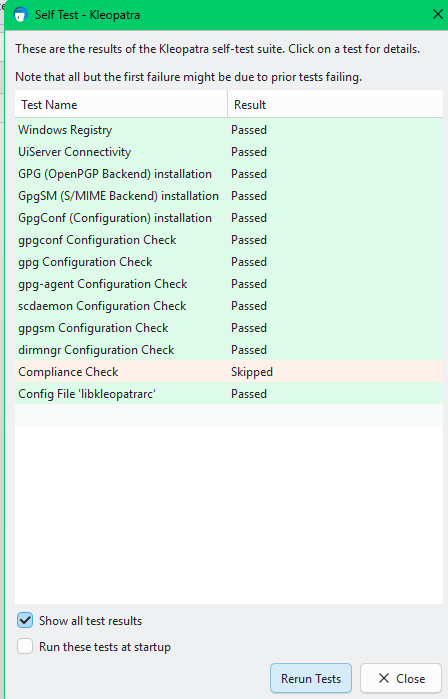
Lets see… Have you checked the self tests in Kleopatra yet? They are in the Tools menu. It would be to easy if the dirmngr test there would fail with a helpful error message, but we should check in any case.

Hi eebb

I didn’t run the self test yet, but did so now. Everything (except for the compliance check, which was skipped) is ‘Passed’, so there shouldn’t be a problem in those checked areas I guess

Best regards
Frank

Hi Bernhard

Thanks for you hint. But I’m using GnuPG on all the gpg’s where I tested the search command. Since it worked for the two out of three gpg’s I assume that the selection of the keyserver shouldn’t be the cause of my problem. Plus my observation when I used ‘Process Monitor’ and ‘Wireshark’ - i.e. that no connection to the keyserver is even attempted by the GPG4WIN gpg, so the gpg didn’t get to the stage where it perhaps could be confused during the communication with the keyserver.

Do you agree - or did I misunderstand your message ?

Best regards
Frank

I wanted to try debugging / logging the dirmngr. So I found some (not quite up to date) info about this in https://gpg4win.org/doc/en/gpg4win-compendium_29.html. This document says one should edit C:\Documents and settings\All Users\Application data\GNU\etc\dirmngr\dirmngr.conf

But I edited C:\Users\<my-user>\AppData\Roaming\gnupg\dirmngr.conf instead by adding:

debug-all
log-file C:\TEMP\dirmngr.log

But even after shutting down Kleopatra and then testing the log-file wasn’t created, so I checked the task manager and saw that two instances of dirmngr.exe were executing (and noticed later on, that normally only one instance should be running - so perhaps this was the problem (=two instances)).

So I killed both those dirmngr.exe and tried the gpg --debug-all --keyserver https://keys.openpgp.org:443 --search-keys CAAE408AEBE2288E96FC5D5E157432CF78A65729command again, and now the log-file was created - AND now it worked !!!

I’m embarrassed to say that I didn’t boot my PC before opening this case - I did restart Kleopatra but that apparently doesn’t stop dirmngr.exe - so a boot would most likely have solved the problem - what a rookie mistake - I apologize !!! :flushed_face:

I still don’t know what caused the error / why there were two instances of the dirmngr.exe running.

But thank you for you very much for your comments comments

A note regarding Kleopatra: For the automatic lookup to work in Kleopatra I still have to manually add hkps://keys.openpgp.orgas and mark the ‘Use the OpenPGP keyserver’. Otherwise the signing key isn’t resolved. And as eebb very correctly mentioned: I had to add it with the hkps://scheme - it doesn’t work with https:// here .
But wouldn’t it be nice/best if Kleopatra used this (or another server that works) by default, if just ‘Search missing keys when verifying a signature’ is selected?

But now everything works nice. Again: Thanks and I apologize for not booting the PC before I reported my problem

Best regards
Frank

1 Like

Hi @flagpg4win,

I’m relieved that you found the cause and it works now.

Yeah, quitting Kleopatra does nothing in regard to the background processes.
On the command line you can stop them with:
gpgconf --kill all
In Kleo you can stop them via Tools → “Restart Background Processes”. Only gpg-agent will restart again immediately, all the others only when they are next needed.

Noted. Keyservers are a sensitive issue here, though, so setting a default server again is currently unlikely.