Title: GpgOL/Web 0.9.2: add-in listed in Outlook on the web but never activates; loopback blocked by Edge Local Network Access by default
Environment
- Gpg4win v5.1.1, GpgOL/Web client 0.9.2, manifest version 0.9.0.0
- Windows 11 Enterprise build 26300.9457 Windows Feature Experience Pack 1000.26100.360.0, domain-managed Microsoft 365 tenant
- Microsoft Edge 154 (Outlook on the web at https://outlook.cloud.microsoft) and New Outlook
- Kleopatra holds a secret key matching the mailbox address
Summary
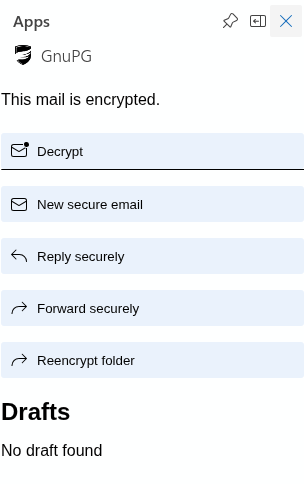
After resolving several setup issues, the GnuPG add-in is installed on the mailbox and listed in the in-message Apps panel of Outlook on the web, and its icon loads from the broker. However, clicking the add-in (or pinning it) does nothing: no request is made to localhost:5656, nothing is logged in the browser console, and the tray client continues to report “Web extension is unavailable”. The add-in never appears at all in New Outlook.
What works
- Certificate setup completed:
%LOCALAPPDATA%\Gpg4win\gpgol-web\tlscontainscertificate-key.pem,certificate.pemandroot-ca.pem, and the local root CA is present inCert:\CurrentUser\Root. - The broker listens on
https://127.0.0.1:5656/, the native client connects over WebSocket and registers successfully. - The tray client shows “Proxy process is running” and “Proxy is connected”.
Issues found during setup
-
“Broker disconnected” on first start. Immediately after certificate installation, the client reported the broker as disconnected. Fully closing the client (including the tray instance) and restarting it resolved this; the server did not appear to restart itself after the certificate was installed.
-
“Copy manifest” produces a malformed Windows path. The path copied to the clipboard uses forward slashes and a double separator:
C:/Users/<user>/AppData/Local/Gpg4win/gpgol-web/manifest//gpgol-web-manifest.xml
This looks like the same path-joining issue seen previously forgpgol-web/tls//certificate-key.pem. -
Manifest references URLs that the broker does not serve (404):
https://localhost:5656/index.html?version=…(DesktopSettings/SourceLocation)https://localhost:5656/assets/script.js(JSRuntime.Url); server log:"No such file or directory" ":/assets/script.js"
All other manifest URLs return 200, including
/home?version=…(used byCommands.Url,EventsRuntime.Url, theFunctionFileand theShowTaskpaneaction) and all icons. I understand these two may be unused by New Outlook and Outlook on the web, but they may affect other clients. -
Edge Local Network Access blocks all loopback requests by default. With default settings, every request from Outlook to the broker failed, with this console error:
Access to fetch at ‘https://localhost:5656/assets/logo.png’ from origin ‘https://outlook.office.com’ has been blocked by CORS policy: Permission was denied for this request to access the
loopbackaddress space.Requests from Outlook’s service worker failed in the same way. Adding the Outlook origins to the Edge policy
LocalNetworkAccessAllowedForUrlsresolved this for the icons:https://outlook.office.comhttps://outlook.cloud.microsoft(Outlook on the web now redirects here)
After that change and a clean session (InPrivate, to avoid Outlook’s cached add-in list), the GnuPG tile showed its icon and both
logo.pngrequests returned 200.I expect this to affect every organisation trying GpgOL/Web with current Edge, so it may be worth documenting. It is also unclear whether New Outlook (WebView2) honours this Edge policy at all.
Current blocker
With the add-in listed and its icon loading, clicking the tile in the in-message Apps panel (or the pinned button) produces:
- no request to
localhost:5656in the Network panel (nohome?version=…load, no WebSocket); - no related error or warning in the console, including at Verbose level;
- no change in the tray client, which still reports “Web extension is unavailable”.
Removing and re-adding the manifest, and testing in a fresh InPrivate session, made no difference.
Questions
- Is there an additional step required for Outlook to open the task pane, for example a consent or trust step specific to custom add-ins served from localhost?
- Is this a known limitation of New Outlook or Outlook on the web with current Edge versions, and is there a recommended configuration (policies or origins) for enterprise deployments?
- Is there any diagnostic logging in the client or broker that would show whether Outlook attempts to contact it when the add-in is invoked?
I am happy to run further tests or provide logs.